# Welcome to console.a-fieldtech.com

## Welcome to console.a-fieldtech.com

Welcome to console.a-fieldtech.com—the gateway to our decentralized edge platform, now operational in over 30 locations worldwide. We are dedicated to empowering startups, web3 innovators, and AI developers by providing a simple, low-cost infrastructure that accelerates your projects without breaking the bank.

**Why Choose Our Edge Platform?**

* **Global Reach:** Leverage our extensive network of edge computing nodes strategically deployed around the globe for optimal performance and low latency.
* **Simplicity at Its Core:** Our platform is designed with user-friendliness in mind, eliminating the complexities often associated with cloud services.
* **Transparent Billing:** Unlike traditional cloud providers, we offer straightforward and transparent pricing. No hidden fees—just clear, predictable costs.
* **Built for Innovation:** Specializing in web3 and AI applications, our infrastructure supports the latest technologies to bring your ideas to life.

**Join Us in Shaping the Future**

We believe that cutting-edge technology should be accessible to all. By minimizing costs and simplifying processes, we're removing barriers and fostering innovation in the tech community.

Get started today and be a part of the decentralized revolution!

### Jump right in

<table data-view="cards"><thead><tr><th></th><th></th><th data-hidden data-card-cover data-type="files"></th><th data-hidden></th><th data-hidden data-card-target data-type="content-ref"></th></tr></thead><tbody><tr><td><strong>Getting Started</strong></td><td><a href="/a-fieldtech-docs/getting-started/quickstart#account-creation">Account Creation</a></td><td></td><td></td><td><a href="/a-fieldtech-docs/getting-started/quickstart">Quickstart</a></td></tr><tr><td><strong>Compute</strong></td><td><a href="/a-fieldtech-docs/compute-power/model-overviews">Model Overviews</a></td><td></td><td></td><td><a href="/a-fieldtech-docs/compute-power/model-overviews">Compute Power</a></td></tr><tr><td><strong>Our Tech Blog</strong></td><td>Use Cases sharing</td><td></td><td></td><td><a href="/a-fieldtech-docs/tech-blog/this-is-the-a-field-tech-tech-blog">This is the A-Field Tech - Tech Blog</a></td></tr></tbody></table>


# Quickstart

This page helps you to create a new account, reset password and manage new users.

## Account Creation

<figure><img src="https://1188029870-files.gitbook.io/~/files/v0/b/gitbook-x-prod.appspot.com/o/spaces%2FCBUyOiZPbX6em9olmY0K%2Fuploads%2FPdcCThFLmpxjszsC3Moe%2FScreenshot%202024-11-19%20at%206.09.43%E2%80%AFPM.png?alt=media&amp;token=c279bd74-f8bf-48ba-b96e-66bc37fa4444" alt=""><figcaption><p>Console Login Screen</p></figcaption></figure>

### Go to <https://console.a-fieldtech.com&#x20>;

{% hint style="info" %}
Click on the "Create an A-Field Tech Console account!"
{% endhint %}

<figure><img src="https://1188029870-files.gitbook.io/~/files/v0/b/gitbook-x-prod.appspot.com/o/spaces%2FCBUyOiZPbX6em9olmY0K%2Fuploads%2FDWtMVhyX1YaCUqucdTbh%2FScreenshot%202024-11-19%20at%206.21.04%E2%80%AFPM.png?alt=media&amp;token=4a47413e-628e-4938-9491-d3388eb5b080" alt=""><figcaption></figcaption></figure>

{% hint style="info" %}
There are two options — Individual Account (Personal) and Company Account (Enterprise).
{% endhint %}

### Platform Notification Email - <no-reply@a-fieldtech.com>

{% hint style="info" %}
"<no-reply@a-fieldtech.com>" is our platform's official email. Please check your spam folder in case your email provider blocks this address.
{% endhint %}

Your registered email will receive a 6-digit verification code from <no-reply@a-fieldtech.com>, and you will receive the same notification every time for 2FA purposes.

<figure><img src="https://1188029870-files.gitbook.io/~/files/v0/b/gitbook-x-prod.appspot.com/o/spaces%2FCBUyOiZPbX6em9olmY0K%2Fuploads%2F6g9oZKeOh6gkNXlO6tSb%2FScreenshot%202024-11-21%20at%2011.54.00%E2%80%AFAM.png?alt=media&amp;token=7a9299bd-f0fe-4cf1-96b2-45ac9cdb0a94" alt=""><figcaption><p>Email Notification Example</p></figcaption></figure>

### Dashboard

You will see the Dashboard - Home, when you login sucessful.

<figure><img src="https://1188029870-files.gitbook.io/~/files/v0/b/gitbook-x-prod.appspot.com/o/spaces%2FCBUyOiZPbX6em9olmY0K%2Fuploads%2F5wVPrqeovUIzIBzQ0iKF%2FScreenshot%202024-11-21%20at%2012.04.12%E2%80%AFPM.png?alt=media&amp;token=db84ae94-f93d-4bcb-a15b-615ee08a5247" alt=""><figcaption></figcaption></figure>

### Next

An introduction about Dashboard


# Dashboard

Below is an overview of all your current resources as shown in the Console Dashboard.

<figure><img src="https://1188029870-files.gitbook.io/~/files/v0/b/gitbook-x-prod.appspot.com/o/spaces%2FCBUyOiZPbX6em9olmY0K%2Fuploads%2FDiExICWxhlsVba7jYrij%2FScreenshot%202024-11-21%20at%201.11.44%E2%80%AFPM.png?alt=media&amp;token=cbf6fb7b-94ec-4907-aea2-02445632500b" alt=""><figcaption></figcaption></figure>

Dark Mode is also available

<figure><img src="https://1188029870-files.gitbook.io/~/files/v0/b/gitbook-x-prod.appspot.com/o/spaces%2FCBUyOiZPbX6em9olmY0K%2Fuploads%2F9MrTsiDjin7k2dktNMyq%2FScreenshot%202024-11-21%20at%201.23.47%E2%80%AFPM.png?alt=media&amp;token=6b59fed0-8758-4ac1-a3d2-0501a3d90ca6" alt=""><figcaption></figcaption></figure>

Below Tags has clearly displayed what resources you're subscribing.&#x20;

<figure><img src="https://1188029870-files.gitbook.io/~/files/v0/b/gitbook-x-prod.appspot.com/o/spaces%2FCBUyOiZPbX6em9olmY0K%2Fuploads%2F3zR4ekA746pUGS4Ym5Bm%2FScreenshot%202024-11-21%20at%201.17.54%E2%80%AFPM.png?alt=media&amp;token=844d5669-b7c5-48c4-af30-9b29b88e4207" alt=""><figcaption></figcaption></figure>

To view the resources on the global map, click the "View My Resources" button.

<figure><img src="https://1188029870-files.gitbook.io/~/files/v0/b/gitbook-x-prod.appspot.com/o/spaces%2FCBUyOiZPbX6em9olmY0K%2Fuploads%2Fex8ykrZaQMpc5QwbjLtH%2FScreenshot%202024-11-21%20at%201.19.31%E2%80%AFPM.png?alt=media&amp;token=1e5bc607-21df-495a-9543-d87d8d3546f4" alt=""><figcaption><p>Here is the exampe</p></figcaption></figure>


# Model Overviews

#### **1.** [**General Deployment Model**](/a-fieldtech-docs/compute-power/editor)

You can spin up an [**Elastic Compute Service (ECS)**](/a-fieldtech-docs/compute-power/editor) **&** [**Bare Metal Server**](/a-fieldtech-docs/compute-power/bms-bare-metal-server-overview) within a minute, and it will automatically assign one public IPv4 address, charging by traffic transaction. This model allows you to enable edge compute quickly and is perfect for instant deployments.

<figure><img src="https://1188029870-files.gitbook.io/~/files/v0/b/gitbook-x-prod.appspot.com/o/spaces%2FCBUyOiZPbX6em9olmY0K%2Fuploads%2FnYrmGpdPmbQR5ymvruOm%2FScreenshot%202024-11-21%20at%204.51.08%E2%80%AFPM.png?alt=media&amp;token=cbad6508-92cd-4318-ae19-77772cd52c6d" alt=""><figcaption></figcaption></figure>

#### **2.** [**CIDR (Super Block) Deployment Model**](/a-fieldtech-docs/network/create-a-cidr-block#cidr-super-block-deployment-model)

If your workload requires a super high volume of public IPv4 blocks, this model allows you to enable nearly unlimited super blocks within a region. All ECS and Bare Metal Servers (BMS) can attach to the same CIDR. It also provides two flexible internet packages, which we will describe more in the [**Networking**](/a-fieldtech-docs/network/create-a-cidr-block) section.

<figure><img src="https://1188029870-files.gitbook.io/~/files/v0/b/gitbook-x-prod.appspot.com/o/spaces%2FCBUyOiZPbX6em9olmY0K%2Fuploads%2FZzHZYt8LTxy2h6yTDzDw%2FScreenshot%202024-11-22%20at%204.03.38%E2%80%AFPM.png?alt=media&amp;token=69da9fe0-be42-43b3-ba64-f6689f2575ac" alt=""><figcaption></figcaption></figure>

#### **3.** [**LECS - Lightweight Elastic Compute Deployment Model**](/a-fieldtech-docs/compute-power/lightweight-elastic-compute-deployment-model-lecs)

We've prepared everything for you. The package predefines the number of CPU cores, RAM, disk space, and internet package. Most importantly, it offers the **lowest cost** for your deployment!

#### 4. GPU Compute

<figure><img src="https://1188029870-files.gitbook.io/~/files/v0/b/gitbook-x-prod.appspot.com/o/spaces%2FCBUyOiZPbX6em9olmY0K%2Fuploads%2FJQjIGwjDs2aNyHjPFbHV%2Fgeforce-ada-4090-web-og-1200x630.jpg?alt=media&amp;token=c6631326-b53e-48c6-970c-6a06534ec308" alt=""><figcaption></figcaption></figure>

As a web3 and AI-focused platform, we offer high-performance GPU servers designed to handle the most demanding workloads with low latency.&#x20;

These servers are optimized for:&#x20;

* [ ] **AI model training and inference**&#x20;
* [ ] **High-throughput web3 applications**&#x20;
* [ ] **Decentralized computational needs** Leveraging cutting-edge GPUs such as the **NVIDIA 4090 and H200**, we ensure that innovators can access the power they need to accelerate their projects

### **Not Sure Which Model Suits You Best?**

We understand that selecting the right deployment model can be challenging. If you're uncertain about which option is the perfect fit for your project, we strongly encourage you to **reach out to us**. Our team of edge computing experts is ready to assist you in identifying the most cost-effective and flexible solution tailored to your specific needs.

### **Get in Touch**

Don't hesitate to contact us for personalized guidance:

* **Email:** <consolesupport@a-fieldtech.com>


# Create a Elastic Compute Service (ECS) - General Deployment Model

## Here are the ECS Deployment Steps

1. **Click on "Computing Power" on the left side Menu**

<div align="left"><figure><img src="https://1188029870-files.gitbook.io/~/files/v0/b/gitbook-x-prod.appspot.com/o/spaces%2FCBUyOiZPbX6em9olmY0K%2Fuploads%2FS6oJOLQVZDlgrByt4Nht%2FScreenshot%202024-11-22%20at%2011.12.57%E2%80%AFAM.png?alt=media&amp;token=a93ec3a5-79f9-4615-99d2-a4cdd1da5893" alt=""><figcaption></figcaption></figure></div>

2. **Select "Elastic Compute Service"**&#x20;

<div align="left"><figure><img src="https://1188029870-files.gitbook.io/~/files/v0/b/gitbook-x-prod.appspot.com/o/spaces%2FCBUyOiZPbX6em9olmY0K%2Fuploads%2FqSZvyvMTH6ma6LQy6UdY%2FScreenshot%202024-11-22%20at%2011.15.29%E2%80%AFAM.png?alt=media&amp;token=a534abf2-2beb-4013-8b81-61f3c24c6882" alt=""><figcaption></figcaption></figure></div>

3. **Click on "Create"**

<div align="left"><figure><img src="https://1188029870-files.gitbook.io/~/files/v0/b/gitbook-x-prod.appspot.com/o/spaces%2FCBUyOiZPbX6em9olmY0K%2Fuploads%2FWO4vfkhYq0pdnMbwIk2K%2FScreenshot%202024-11-22%20at%2011.17.32%E2%80%AFAM.png?alt=media&amp;token=08c2db9c-b29c-40cc-b104-21942aa64dd7" alt=""><figcaption></figcaption></figure></div>

4. **Select System Disk & Data Disk**

<div align="left"><figure><img src="https://1188029870-files.gitbook.io/~/files/v0/b/gitbook-x-prod.appspot.com/o/spaces%2FCBUyOiZPbX6em9olmY0K%2Fuploads%2FkSmJn10EdeVM0sq7nLLt%2FScreenshot%202024-11-22%20at%2011.50.53%E2%80%AFAM.png?alt=media&amp;token=825e8716-78b8-42b3-bec9-4488eff4816b" alt=""><figcaption></figcaption></figure></div>

5. **Select OS**

<figure><img src="https://1188029870-files.gitbook.io/~/files/v0/b/gitbook-x-prod.appspot.com/o/spaces%2FCBUyOiZPbX6em9olmY0K%2Fuploads%2FZ4Qz1znvAbdRPp6N4gcF%2FScreenshot%202024-11-22%20at%2011.52.22%E2%80%AFAM.png?alt=media&amp;token=2197f012-585a-4ab3-971a-b859d69f48be" alt=""><figcaption></figcaption></figure>

{% hint style="info" %}
We have different types of OS. For Microsoft Windows, our platform takes care of the OS deployment only, and customers will need to purchase the license key from Microsoft directly in order to activate the full features.
{% endhint %}

{% hint style="success" %}
**Custom OS Options**:

1. **Custom Image Import**:
   * Customers can provide their custom OS image, which will be uploaded and imported into the system.
   * VMs can then be created based on the imported image.

2. **Custom VM Configuration**:
   * A VM can be created, configured, and then converted into a **custom image** for future use.
     {% endhint %}

3. **Choose Authentication Method**
   1. Password
   2. SSH Key ([SSH Key creation](/a-fieldtech-docs/compute-power/interactive-blocks#ssh-key))

<figure><img src="https://1188029870-files.gitbook.io/~/files/v0/b/gitbook-x-prod.appspot.com/o/spaces%2FCBUyOiZPbX6em9olmY0K%2Fuploads%2FLs0R2gf328WuqOaZ4Jsd%2FScreenshot%202024-11-22%20at%2012.04.19%E2%80%AFPM.png?alt=media&amp;token=85be7886-1425-4390-8543-1f224cd85f5d" alt=""><figcaption></figcaption></figure>

7. **Select Security Group (Security Group Creation)**

<figure><img src="https://1188029870-files.gitbook.io/~/files/v0/b/gitbook-x-prod.appspot.com/o/spaces%2FCBUyOiZPbX6em9olmY0K%2Fuploads%2FiATDZ0wAefCM1Eo4PWkR%2FScreenshot%202024-11-22%20at%2012.07.20%E2%80%AFPM.png?alt=media&amp;token=effc5295-47ec-4703-85fa-78e8efe2de70" alt=""><figcaption></figcaption></figure>

8. **Select Bandwidth Billing Mode**

<div align="left"><figure><img src="https://1188029870-files.gitbook.io/~/files/v0/b/gitbook-x-prod.appspot.com/o/spaces%2FCBUyOiZPbX6em9olmY0K%2Fuploads%2FWj3xaSDkZ34aUN46kEs9%2FScreenshot%202024-11-22%20at%2012.08.03%E2%80%AFPM.png?alt=media&amp;token=01f4371a-e1cf-4131-89f5-d32ea43d0d5b" alt=""><figcaption></figcaption></figure></div>

{% hint style="info" %}
In general use cases, the **"Global"** option is the default for internet access. However, for some regions, we have enabled cross-region low-latency bandwidth—for example, Hong Kong has the **CN2 (Premium China internet access option)**.

Please reach out to **<consolesupport@a-fieldtech.com>** if you have specific internet requirements.
{% endhint %}

9. **Select the Bandwidth**&#x20;

<div align="left"><figure><img src="https://1188029870-files.gitbook.io/~/files/v0/b/gitbook-x-prod.appspot.com/o/spaces%2FCBUyOiZPbX6em9olmY0K%2Fuploads%2Fz1R6J67oghuiSXWLVESR%2FScreenshot%202024-11-22%20at%2012.25.17%E2%80%AFPM.png?alt=media&amp;token=a4b961f4-c92a-4bd0-8803-b5bc3e89f2e5" alt=""><figcaption></figcaption></figure></div>

{% hint style="info" %}
Bandwidth pricing is dynamic; it depends on the location you select. However, you will see the cost per Mbps when you deploy the server.
{% endhint %}

10. &#x20;**Assign Additional Public IPv4 (Optional)**

<div align="left"><figure><img src="https://1188029870-files.gitbook.io/~/files/v0/b/gitbook-x-prod.appspot.com/o/spaces%2FCBUyOiZPbX6em9olmY0K%2Fuploads%2FIUGiOGvOEujfONuS008S%2FScreenshot%202024-11-22%20at%2012.54.39%E2%80%AFPM.png?alt=media&amp;token=212ccfbe-9b3a-490a-8258-348dfdcd2550" alt=""><figcaption></figcaption></figure></div>

{% hint style="info" %}
You can attach up to 64 Public IPv4 into a single server, but if your server required more than 64 IP addresses per Host. Please see the[ Network section](/a-fieldtech-docs/network/create-a-cidr-block).
{% endhint %}

### Confirm The Configuration

This is the final stage. The ECS is flexible, and our pay-as-you-go model supports daily billing.

<figure><img src="https://1188029870-files.gitbook.io/~/files/v0/b/gitbook-x-prod.appspot.com/o/spaces%2FCBUyOiZPbX6em9olmY0K%2Fuploads%2FTwE2E72Ayup8shLPbsu4%2FScreenshot%202024-11-22%20at%2012.57.28%E2%80%AFPM.png?alt=media&amp;token=4c77e32d-9a6f-4d32-80a5-3c9a80852d4b" alt=""><figcaption></figcaption></figure>

### Server Status

After confirmation, within a couple of minutes, you will be able to check your server status on the **homepage** [**dashboard**](/a-fieldtech-docs/getting-started/publish-your-docs) or the **Elastic Compute Service** page.

<figure><img src="https://1188029870-files.gitbook.io/~/files/v0/b/gitbook-x-prod.appspot.com/o/spaces%2FCBUyOiZPbX6em9olmY0K%2Fuploads%2FI7T0eFQpLI5ZIcaDSH76%2FScreenshot%202024-11-22%20at%201.15.44%E2%80%AFPM.png?alt=media&amp;token=b638a476-9e4a-4853-8bdc-ed18c2412c61" alt=""><figcaption></figcaption></figure>


# BMS (Bare Metal Server) Overview

## Multiple Architectures to Choose From

BMS offers flexibility with **x86 products** and support for multiple architectures, such as **GPU** and **ARM**, which can be selected based on business needs.

#### Architecture Highlights:

* **GPU and ARM**:
  * Exclusively adapted for specialized workloads, including:
    * Cloud gaming
    * Rendering
    * Blockchain applications

## Exclusive Computing Power Service

* **Dedicated Physical Servers**:
  * Achieve up to **40% reduction in peak response time** compared to virtual machines.
  * Eliminates interference from other tenants, ensuring consistent performance.

## Interconnection and Interoperability

* **Global Edge Connectivity**:
  * Connect to **30+ edge computing nodes worldwide** through dedicated lines via [**AFT Console Connectivity**](/a-fieldtech-docs/network/connectivity)
* **Direct Cloud Connectivity**:
  * Seamlessly integrate with major public cloud providers, including:
    * AWS
    * Azure
    * Alibaba Cloud
    * Tencent Cloud
    * Huawei Cloud

## Self-Service Activation

* **Quick Setup**:
  * Activate services through the **console self-service platform** within **10 minutes**.
* **Scalability**:
  * Adjust resources as needed:
    * **Increase or decrease bandwidth**
    * **Allocate additional IPs**


# Lightweight Elastic Compute Deployment Model (LECS)

We’ve prepared everything you need! The **Lightweight Elastic Compute Deployment Model (LECS)** offers preconfigured packages to simplify your deployment process. Each package defines the number of CPU cores, RAM, disk space, and an internet package to ensure a seamless and efficient setup. Most importantly, these models provide the **lowest cost** for your deployment needs.

#### Predefined LECS Models

Below are the three predefined models available:

<table data-header-hidden><thead><tr><th></th><th width="125"></th><th width="97"></th><th width="123"></th><th></th><th>Subnet</th></tr></thead><tbody><tr><td><strong>Model</strong></td><td><strong>CPU Cores</strong></td><td><strong>RAM</strong></td><td><strong>Disk Space</strong></td><td><strong>Internet Package</strong></td><td><strong>Subnet (Public IPv4)</strong></td></tr><tr><td>Model A</td><td>4 cores</td><td>16 GB</td><td>200 GB</td><td>100 Mbps</td><td>/27</td></tr><tr><td>Model B</td><td>4 cores</td><td>16GB </td><td>500 GB</td><td>100 Mbps</td><td>/24</td></tr><tr><td>Model C</td><td>4 cores</td><td>16 GB</td><td>500 GB</td><td>500 Mbps</td><td>/24</td></tr></tbody></table>

Each LECS model is designed to balance performance and cost, ensuring you have the resources you need without overspending.


# Compute Management

## Server Status and Info

<figure><img src="https://1188029870-files.gitbook.io/~/files/v0/b/gitbook-x-prod.appspot.com/o/spaces%2FCBUyOiZPbX6em9olmY0K%2Fuploads%2Fu1Q5S3ja6QHDrJRyFfky%2FScreenshot%202024-11-22%20at%204.24.00%E2%80%AFPM.png?alt=media&amp;token=ad13ea83-d4b4-4e42-8ebf-f4944f86c6c3" alt=""><figcaption></figcaption></figure>

**Status:** Check the current status of the compute instance.

**SID/Name:** The name you assigned to the compute instance. The **SID** is a unique service ID used for billing, resource attachment, troubleshooting, and more.

**IP Address:** Displays both the private network and public network addresses

<details>

<summary>About Private Network</summary>

The private IP address is automatically generated. If you use the **"inter-region"** link across different edge locations, you can request our backend team to modify the private subnet ranges.

</details>

**Billing Cycle:** Displays the instance creation date and, most importantly, the instance expiry date.

<details>

<summary>Expiry Date Notification</summary>

To prevent data loss or service impact, our platform will notify customers when a resource reaches **"Maturity"** status or when their credit is running low, to ensure the instance continues running.\
Please ensure you have whitelisted **<no-reply@a-fieldtech.com>**.

</details>

### Reboot / Shutdown

You can restart, shut down, or start your instances directly from the **"Elastic Compute Service"** list. By selecting the checkbox on the left side, you can also perform batch actions for restart, shutdown, or startup.

<figure><img src="https://1188029870-files.gitbook.io/~/files/v0/b/gitbook-x-prod.appspot.com/o/spaces%2FCBUyOiZPbX6em9olmY0K%2Fuploads%2FhgWSb4Rlz3QqTqGugima%2FScreenshot%202024-11-22%20at%204.48.12%E2%80%AFPM.png?alt=media&amp;token=80facc75-4da9-4f1a-b63e-02c398dbb631" alt=""><figcaption></figcaption></figure>

### More Actons

Click on **"More"** on the far right side to access additional actions.

<figure><img src="https://1188029870-files.gitbook.io/~/files/v0/b/gitbook-x-prod.appspot.com/o/spaces%2FCBUyOiZPbX6em9olmY0K%2Fuploads%2FVfmQxJIEDAl0RkL2eucX%2FScreenshot%202024-11-22%20at%204.48.59%E2%80%AFPM.png?alt=media&amp;token=ac48bfd2-f684-49cd-878e-162840eb5500" alt=""><figcaption></figcaption></figure>

### Monitoring

Click on **"Details"** to enter the resource monitoring page, where you can view CPU, memory, and network-related information

<figure><img src="https://1188029870-files.gitbook.io/~/files/v0/b/gitbook-x-prod.appspot.com/o/spaces%2FCBUyOiZPbX6em9olmY0K%2Fuploads%2FXZDX8o9Z10RgfsqThlUN%2FScreenshot%202024-11-22%20at%204.53.24%E2%80%AFPM.png?alt=media&amp;token=8a6317b9-af1a-46c7-b184-c4ddc90dad6e" alt=""><figcaption></figcaption></figure>

### **Console**

Click on **"Console"** to enter console mode for the server. This feature provides emergency remote access to your instance directly from the management portal.

<figure><img src="https://1188029870-files.gitbook.io/~/files/v0/b/gitbook-x-prod.appspot.com/o/spaces%2FCBUyOiZPbX6em9olmY0K%2Fuploads%2FTCYnprRe2YdIQyrtrBwM%2FScreenshot%202024-11-22%20at%204.57.53%E2%80%AFPM.png?alt=media&amp;token=2ad3ecbd-d545-4b5d-bbc4-07547279384b" alt=""><figcaption></figcaption></figure>

<figure><img src="https://1188029870-files.gitbook.io/~/files/v0/b/gitbook-x-prod.appspot.com/o/spaces%2FCBUyOiZPbX6em9olmY0K%2Fuploads%2FpKnChLkuLaI6Ac7XWcjk%2FScreenshot%202024-11-22%20at%204.59.33%E2%80%AFPM.png?alt=media&amp;token=62ab021c-d7bf-4e46-ad69-3e40c9a326f3" alt=""><figcaption></figcaption></figure>


# Security

### Security Group

It is a madatory requirement to apply Security Group when you deploy the ECS/BMS/LECS, you can use the default security group and create your own. And the security group has two directions.

{% tabs %}
{% tab title="In Direction" %}

<figure><img src="https://1188029870-files.gitbook.io/~/files/v0/b/gitbook-x-prod.appspot.com/o/spaces%2FCBUyOiZPbX6em9olmY0K%2Fuploads%2FLUc3A6E4jV0lieceEmsk%2FScreenshot%202024-11-22%20at%205.11.04%E2%80%AFPM.png?alt=media&amp;token=418b0533-bcc9-488c-bc63-3a59e133b0ee" alt=""><figcaption></figcaption></figure>
{% endtab %}

{% tab title="Out Direction" %}

<figure><img src="https://1188029870-files.gitbook.io/~/files/v0/b/gitbook-x-prod.appspot.com/o/spaces%2FCBUyOiZPbX6em9olmY0K%2Fuploads%2FxItRJCvh5sohz7zRoEYg%2FScreenshot%202024-11-22%20at%205.11.38%E2%80%AFPM.png?alt=media&amp;token=6ed24c72-dff6-41f8-98f2-3dc4a74d6778" alt=""><figcaption></figcaption></figure>
{% endtab %}
{% endtabs %}

{% hint style="info" %}

**Kind Tips**

* **Priority:** The optional priority range is 1-100, with a default value of 1, representing the highest priority.
* **Port Range:** The value range is 1 to 65535. For example, you can set it as "1/200" or "80/80". The value "-1/-1" cannot be set independently and indicates no port restrictions.
* **Authorization Object:** Set the CIDR for the authorization object based on your actual scenario. Note that **0.0.0.0/0** or a mask of 0 means access from all IPs is allowed or denied. Please handle this configuration with caution.
  {% endhint %}

### SSH Key

Click on "SSH Key" from and left side menu, and click on "Create" Button, and you will see this screen. Create a "Public Key Name" and paste your public key into the "Public Key" box

<figure><img src="https://1188029870-files.gitbook.io/~/files/v0/b/gitbook-x-prod.appspot.com/o/spaces%2FCBUyOiZPbX6em9olmY0K%2Fuploads%2FMvtVfhXcVu5cxuWq0wpm%2FScreenshot%202024-11-22%20at%205.14.05%E2%80%AFPM.png?alt=media&amp;token=349b889b-4897-4884-8bfc-8bc973031fd5" alt=""><figcaption></figcaption></figure>

{% hint style="info" %}
Question about generating your SSH Public Key?&#x20;

See [This](/a-fieldtech-docs/compute-power/interactive-blocks/generating-an-ssh-key-pair) or Search "Generating SSH Public Key" from public search engine
{% endhint %}


# Generating an SSH Key Pair

### **Linux/MacOS**

1. Open a terminal and use the `ssh-keygen` utility to create your key.\
   For a 2048-bit RSA key:

   ```bash
   bashCopy codessh-keygen -t rsa
   ```

   For increased security, generate a 4096-bit RSA key:

   ```bash
   bashCopy codessh-keygen -t rsa -b 4096
   ```

   *Note:* RSA is recommended over DSA because DSA keys are limited to 1024 bits.
2. When prompted, press **Enter** to use the default location (e.g., `/home/your_username/.ssh/id_rsa` on Linux or `/Users/your_username/.ssh/id_rsa` on Mac), or specify a custom location if needed (e.g., creating a second key).
3. Enter a secure passphrase.
   * This passphrase is required to unlock your private key, adding an extra layer of security.
   * Without a passphrase, someone with your private key could access accounts tied to that key.
4. Confirm your passphrase when prompted.
5. Once complete, `ssh-keygen` will generate:
   * A **private key** (e.g., `id_rsa`) in the specified location.
   * A **public key** (e.g., `id_rsa.pub`) in the same location.
6. To use the public key:
   * For remote access, copy and paste the contents of the public key file into the `~/.ssh/authorized_keys` file on the server.
   * To share with a team, send the **public key** (never share the private key).

***

### **Windows (Using PuTTY)**

1. Download and start the **puttygen.exe** key generator.
2. In the **Key** section, select **SSH-2 RSA**, then click **Generate**.
3. Move your mouse randomly in the small window to generate entropy for the key pair.
4. Add a key comment to identify the key (useful when managing multiple keys).
5. Enter and confirm a passphrase to protect your key.
6. Save your keys:
   * Click **Save private key** to store your private key securely.
   * Click **Save public key** to save your public key.
7. To use the key with PuTTY:
   * Open PuTTY and navigate to **Connection -> SSH -> Auth**.
   * Browse and select your private key file.

***

### **Important Notes**

* Always keep your **private key** secure and never share it.
* Use the **public key** to:
  * Add to `~/.ssh/authorized_keys` for servers you control.
  * Share with teams or projects requiring access.

By following these steps, you ensure secure and efficient SSH access for your use cases.


# ECS Models Reference

## About our compute

Our platform, powered by **Intel® Platinum** processors and optional **NVIDIA Tesla vGPUs**, is tailored for demanding workloads like **AI training and inference**, **Web3 and blockchain applications**, and **high-frequency trading (HFT)**.&#x20;

With high core counts, multi-threading, and optimized parallel computing capabilities, it delivers the low latency, scalability, and computational efficiency needed for cutting-edge technologies and financial systems.

<table><thead><tr><th width="119">Model</th><th width="80">vCPU</th><th width="103">RAM</th><th width="137">Local Storage</th><th width="278">Server Disk Space</th></tr></thead><tbody><tr><td>C-1G</td><td>1</td><td>1 GB</td><td>1 GB - 128 GB</td><td>Configurable from 10 GB to 2 TB</td></tr><tr><td>1C-2G</td><td>1</td><td>2 GB</td><td>1 GB - 128 GB</td><td>Configurable from 10 GB to 2 TB</td></tr><tr><td>1C-4G</td><td>1</td><td>4 GB</td><td>1 GB - 128 GB</td><td>Configurable from 10 GB to 2 TB</td></tr><tr><td>2C-2G</td><td>2</td><td>2 GB</td><td>1 GB - 128 GB</td><td>Configurable from 10 GB to 2 TB</td></tr><tr><td>2C-4G</td><td>2</td><td>4 GB</td><td>1 GB - 128 GB</td><td>Configurable from 10 GB to 2 TB</td></tr><tr><td>2C-8G</td><td>2</td><td>8 GB</td><td>1 GB - 128 GB</td><td>Configurable from 10 GB to 2 TB</td></tr><tr><td>4C-4G</td><td>4</td><td>4 GB</td><td>1 GB - 128 GB</td><td>Configurable from 10 GB to 2 TB</td></tr><tr><td>4C-8G</td><td>4</td><td>8 GB</td><td>1 GB - 128 GB</td><td>Configurable from 10 GB to 2 TB</td></tr><tr><td>4C-16G</td><td>4</td><td>16 GB</td><td>1 GB - 128 GB</td><td>Configurable from 10 GB to 2 TB</td></tr><tr><td>8C-8G</td><td>8</td><td>8 GB</td><td>1 GB - 128 GB</td><td>Configurable from 10 GB to 2 TB</td></tr><tr><td>8C-16G</td><td>8</td><td>16 GB</td><td>1 GB - 128 GB</td><td>Configurable from 10 GB to 2 TB</td></tr><tr><td>8C-32G</td><td>8</td><td>32 GB</td><td>1 GB - 128 GB</td><td>Configurable from 10 GB to 2 TB</td></tr><tr><td>8C-64G</td><td>8</td><td>64 GB</td><td>1 GB - 128 GB</td><td>Configurable from 10 GB to 2 TB</td></tr><tr><td>16C-16G</td><td>16</td><td>16 GB</td><td>1 GB - 128 GB</td><td>Configurable from 10 GB to 2 TB</td></tr><tr><td>16C-32G</td><td>16</td><td>32 GB</td><td>1 GB - 128 GB</td><td>Configurable from 10 GB to 2 TB</td></tr><tr><td>16C-64G</td><td>16</td><td>64 GB</td><td>1 GB - 128 GB</td><td>Configurable from 10 GB to 2 TB</td></tr><tr><td>32C-32G</td><td>32</td><td>32 GB</td><td>1 GB - 128 GB</td><td>Configurable from 10 GB to 2 TB</td></tr><tr><td>32C-64G</td><td>32</td><td>64 GB</td><td>1 GB - 128 GB</td><td>Configurable from 10 GB to 2 TB</td></tr><tr><td>32C-128G</td><td>32</td><td>128 GB</td><td>1 GB - 128 GB</td><td>Configurable from 10 GB to 2 TB</td></tr><tr><td>64C-64G</td><td>64</td><td>64 GB</td><td>1 GB - 128 GB</td><td>Configurable from 10 GB to 2 TB</td></tr><tr><td>64C-128G</td><td>64</td><td>128 GB</td><td>1 GB - 128 GB</td><td>Configurable from 10 GB to 2 TB</td></tr></tbody></table>


# Create a CIDR Block

## **CIDR (Super Block) Deployment Model**

If your workload requires a super high volume of public IPv4 blocks, this model allows you to enable nearly unlimited super blocks within a region. All ECS and Bare Metal Servers (BMS) can attach to the same CIDR. It also provides two flexible internet data packages, which we will describe more in the **Networking** section.

***

<figure><img src="https://1188029870-files.gitbook.io/~/files/v0/b/gitbook-x-prod.appspot.com/o/spaces%2FCBUyOiZPbX6em9olmY0K%2Fuploads%2FZzHZYt8LTxy2h6yTDzDw%2FScreenshot%202024-11-22%20at%204.03.38%E2%80%AFPM.png?alt=media&amp;token=69da9fe0-be42-43b3-ba64-f6689f2575ac" alt=""><figcaption></figcaption></figure>

## The deployment workflow

{% stepper %}
{% step %}

### [Select Internet Package](#create-a-shared-data-package-shared-95th-bandwidth)

{% endstep %}

{% step %}

### [Create a CIDR Block](#create-a-cidr)

{% endstep %}

{% step %}

### [Associate the Internet Package with the CIDR](#bind-your-cidr-to-the-internet-package)

{% endstep %}

{% step %}

### [Create ECS/BMS](#bind-your-cidr-to-the-internet-package)

{% endstep %}

{% step %}

### [Select the corresponding Internet Package](#now-you-will-see-this-internet-package-when-you-create-ecs-bms)

{% endstep %}
{% endstepper %}

<figure><img src="https://1188029870-files.gitbook.io/~/files/v0/b/gitbook-x-prod.appspot.com/o/spaces%2FCBUyOiZPbX6em9olmY0K%2Fuploads%2FYqQrKESIvAJXrULc3uWd%2FScreenshot%202024-11-22%20at%204.05.14%E2%80%AFPM.png?alt=media&amp;token=6fd0c198-16e9-40be-828b-49bf1218fd32" alt=""><figcaption></figcaption></figure>

***

### Create a Shared Data Package / Shared 95th Bandwidth

#### There are two internet package options available; both options provide sharing capabilities to reduce the cost of traffic usage. It is also suitable for workloads that require scalable options. Imagine your application or workload may require additional compute resources, and your ECS can leverage the same internet package to reduce the individual internet cost.

<table><thead><tr><th width="256">Package Name</th><th width="481">Option Details</th></tr></thead><tbody><tr><td>Shared Data Package</td><td>This option charged by traffic transaction</td></tr><tr><td>Shared 95th Bandwidth</td><td>Allows cloud servers (ECS) and bare metal products to share traffic simultaneously.</td></tr></tbody></table>

### Select the Region and Traffic

<figure><img src="https://1188029870-files.gitbook.io/~/files/v0/b/gitbook-x-prod.appspot.com/o/spaces%2FCBUyOiZPbX6em9olmY0K%2Fuploads%2FIqrgjVoT1RpaGdR1P8iF%2FScreenshot%202024-11-22%20at%203.59.15%E2%80%AFPM.png?alt=media&amp;token=b6a4d911-aefd-498b-ac5a-808993b85d65" alt=""><figcaption></figcaption></figure>

### Create a CIDR

Go to the left menu again, and select Network -> CIDR Block&#x20;

Click on the Create CIDR Block Button

<figure><img src="https://1188029870-files.gitbook.io/~/files/v0/b/gitbook-x-prod.appspot.com/o/spaces%2FCBUyOiZPbX6em9olmY0K%2Fuploads%2FCpKxpEkZqykmflf8amPh%2FScreenshot%202024-11-22%20at%201.52.29%E2%80%AFPM.png?alt=media&amp;token=af9d995e-08bf-4cf5-ac21-e92fa96adfbd" alt=""><figcaption></figcaption></figure>

### Select CIDR Region

<figure><img src="https://1188029870-files.gitbook.io/~/files/v0/b/gitbook-x-prod.appspot.com/o/spaces%2FCBUyOiZPbX6em9olmY0K%2Fuploads%2FNS4kz8JenOmlYKIadayI%2FScreenshot%202024-11-22%20at%202.25.33%E2%80%AFPM.png?alt=media&amp;token=e354526a-d676-47e0-80a9-103e05218cc7" alt=""><figcaption></figcaption></figure>

> <mark style="background-color:green;">**If you require a super large block of IPv4 addresses, please be sure to reach out to us, as our team can offer you a more cost-effective bundle package!**</mark>

{% hint style="info" %}
Similar to our internet packages, we offer several different IP types, but by default, the **"Global"** type is selected, which is the most general option. If your use case requires a specific IP type, please reach out to **<consolesupport@a-fieldtech.com>**.
{% endhint %}

***

### Check your CIDR Block

#### After the CIDR creation is successful, you can check your CIDR resources under the **"CIDR Block"** tab on the left-side menu bar.

<figure><img src="https://1188029870-files.gitbook.io/~/files/v0/b/gitbook-x-prod.appspot.com/o/spaces%2FCBUyOiZPbX6em9olmY0K%2Fuploads%2Fisu2XkSAt0IXsrHwy0WL%2FScreenshot%202024-11-22%20at%202.31.17%E2%80%AFPM.png?alt=media&amp;token=eaf100f7-7430-459d-8169-4f89cdb55007" alt=""><figcaption></figcaption></figure>

### Bind Your CIDR to the Internet Package

Click on the **"Set Relationship"** from the left menu bar.

<figure><img src="https://1188029870-files.gitbook.io/~/files/v0/b/gitbook-x-prod.appspot.com/o/spaces%2FCBUyOiZPbX6em9olmY0K%2Fuploads%2FcrAnM6Yqg17ChOf2xXqs%2FScreenshot%202024-11-22%20at%204.09.52%E2%80%AFPM.png?alt=media&amp;token=5a3a8afe-d823-44b6-8526-1b4bf403e5e3" alt=""><figcaption></figcaption></figure>

You will see this screen, and find your CIDR from the "drop menu" and Click the "Bind" button.

<figure><img src="https://1188029870-files.gitbook.io/~/files/v0/b/gitbook-x-prod.appspot.com/o/spaces%2FCBUyOiZPbX6em9olmY0K%2Fuploads%2FDrvWImVcreI60i8Xoub4%2FScreenshot%202024-11-22%20at%204.14.10%E2%80%AFPM.png?alt=media&amp;token=1997b405-72fb-4231-9903-dcf9eff70bdb" alt=""><figcaption></figcaption></figure>

***

### Now, you will see this internet package when you create ECS/BMS

<figure><img src="https://1188029870-files.gitbook.io/~/files/v0/b/gitbook-x-prod.appspot.com/o/spaces%2FCBUyOiZPbX6em9olmY0K%2Fuploads%2FXwvQpiDOMUKmJjeEMj2p%2FScreenshot%202024-11-22%20at%204.17.37%E2%80%AFPM.png?alt=media&amp;token=33c7a951-c477-400e-93e3-c5bd2f0b7daa" alt=""><figcaption></figcaption></figure>


# Connectivity

## **Cross-Region Private Connectivity**

### **Seamless Private Connections for Your Global Infrastructure**

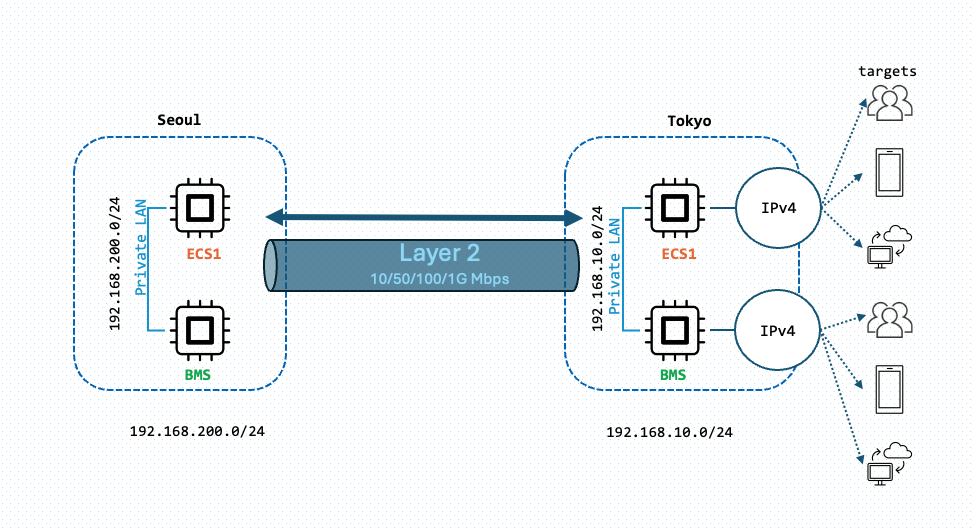
At **A-Field Tech**, we enable businesses to build secure, high-performance private networks that span regions, integrate with public clouds, and connect seamlessly to on-premises infrastructure. Whether you need **pure Layer 2 connectivity** for simple private links or a **meshed design** with advanced routing, our platform provides the flexibility to meet your needs.

With our **Edge Console**, you can establish secure, low-latency private links between regions, connect to **public cloud providers**, or extend your network to **on-premises environments** via local telco connections into our **Edge Data Centers**.

***

### **Private Connectivity Options**

### **1. Pure Layer 2 Cross-Region Connectivity**

For straightforward private links between two regions, we offer **pure Layer 2 connections**, providing:

* **Low-latency, high-speed communication** between regions.
* A simple and efficient setup for directly connecting applications.
* A foundation for hybrid or multi-cloud deployments.

<figure><img src="https://1188029870-files.gitbook.io/~/files/v0/b/gitbook-x-prod.appspot.com/o/spaces%2FCBUyOiZPbX6em9olmY0K%2Fuploads%2FH40lYpM9LiWKhjNL7JZc%2FScreenshot%202024-11-28%20at%204.21.22%E2%80%AFPM.png?alt=media&amp;token=23e07966-7329-4fa1-aa08-b9893ced9ed6" alt=""><figcaption></figcaption></figure>

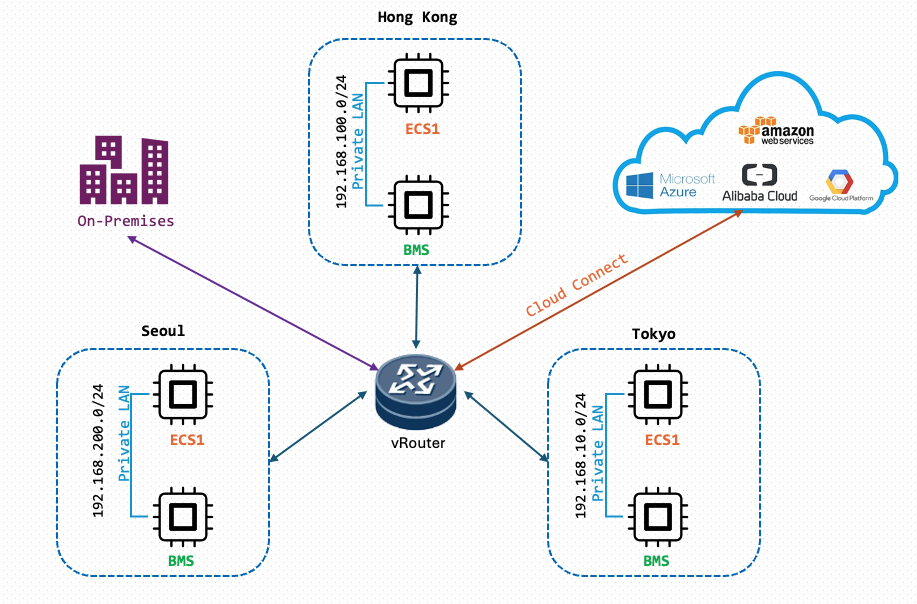
### **2. Meshed Design with Advanced Routing**

For more complex deployments, our platform supports **meshed connectivity** with advanced routing capabilities. This solution enables:

* **Dynamic Routing Protocols**:\
  Support for protocols like **OSPF**, **BGP**, or **static Layer 3 routing**, ensuring seamless communication across multiple regions.
* **Multi-Region Scalability**:\
  Easily connect three or more regions with optimized routing for high availability and performance.
* **Cloud Interconnectivity**:\
  Extend your private network to connect with **public cloud providers**, enabling hybrid or multi-cloud solutions.
* **On-Premises Integration**:\
  Connect your **on-premises infrastructure** to our **Edge Data Centers** via **local telco connections**, creating a unified and resilient private network.

<figure><img src="https://1188029870-files.gitbook.io/~/files/v0/b/gitbook-x-prod.appspot.com/o/spaces%2FCBUyOiZPbX6em9olmY0K%2Fuploads%2FCvzsgn1ecNeOrwIB43Oj%2FScreenshot%202024-11-28%20at%204.22.24%E2%80%AFPM.png?alt=media&amp;token=c4857b30-f750-461d-b375-739a1fa39004" alt=""><figcaption></figcaption></figure>

***

### Designed for Your Use Case&#x20;

#### Our cross-region private connectivity solutions are ideal for:

* **Global Enterprises**: Securely connect infrastructure across multiple regions while integrating on-premises environments.&#x20;
* **Web3 & AI Applications**: Build decentralized and resilient architectures with seamless private links.
* **Hybrid Cloud Environments:** Extend your private network to include public clouds and on-premises systems for a unified hybrid architecture.

***

### **Get Started Today**

Whether you need cross-region private links, on-premises integration, or hybrid cloud connectivity, we’re here to help.&#x20;

Contact us at [**consolesupport@a-fieldtech.com**](mailto:consolesupport@a-fieldtech.com) to discuss your project and explore the best solutions for your business.


# Anti-DDoS Bandwidth Protection

## **Enterprise-Grade DDoS Protection Built-In**

At A-Field Tech, we understand the importance of protecting your applications and infrastructure from malicious attacks. That’s why every instance deployed on our platform benefits from **native, high-capacity Anti-DDoS protection**—completely **free of charge**.

With our robust and resilient infrastructure, we provide [**Standard Anti-DDoS protection**](#standard-anti-ddos-protection) to safeguard your workloads against unexpected traffic surges and attacks. This ensures your applications maintain high availability and performance even under challenging conditions.

If your requirements go beyond our built-in protection, we offer [**dedicated Anti-DDoS packages**](#dedicated-anti-ddos-packages) tailored to your specific needs. Our team is always available to discuss and customize solutions that align with your business goals.&#x20;

### **Standard Anti-DDoS Protection**

* **Default Protection Threshold**:\
  All instances are protected with a default Anti-DDoS capacity of **10Gbps**.
* **Traffic Management**:\
  Traffic exceeding the 10Gbps threshold will be routed into a **black hole** to protect the rest of the network from disruption.

### **Dedicated Anti-DDoS Packages**

For businesses requiring additional protection, we offer **dedicated Anti-DDoS packages** that provide enhanced capacity and flexibility:

* **Clean Traffic Billing**:\
  Cleaned traffic is billed based on the **95th percentile bandwidth usage** model.
* **Pricing**:
  * Pricing and capacity can be customized to meet your needs.
* **Service Level Agreement (SLA)**:
  * We guarantee **99.9% uptime** for dedicated Anti-DDoS services, ensuring reliability and availability.

#### Feel free to contact us at [**consolesupport@a-fieldtech.com**](mailto:consolesupport@a-fieldtech.com) for more details.


# This is the A-Field Tech - Tech Blog

<table data-card-size="large" data-view="cards"><thead><tr><th></th><th data-hidden></th><th data-hidden></th><th data-hidden data-card-cover data-type="files"></th><th data-hidden data-card-target data-type="content-ref"></th></tr></thead><tbody><tr><td>Post Date: 2024/11/25</td><td></td><td></td><td><a href="https://1188029870-files.gitbook.io/~/files/v0/b/gitbook-x-prod.appspot.com/o/spaces%2FCBUyOiZPbX6em9olmY0K%2Fuploads%2FE918fMU5MGb0hWyZTjok%2FLightning-Fast%20Trades%20Why%20Crypto%20Traders%20Must%20Bypass%20Cloud%20Backbones%20with%20AWS%20Direct%20Connect.png?alt=media&amp;token=fe806870-2a92-49b6-b3ad-50268f540836">Lightning-Fast Trades Why Crypto Traders Must Bypass Cloud Backbones with AWS Direct Connect.png</a></td><td><a href="/a-fieldtech-docs/tech-blog/this-is-the-a-field-tech-tech-blog/building-resilient-crypto-trading-with-ultra-low-latency-ull-a-dual-connection-setup-for-speed-an">Building Resilient Crypto Trading with Ultra-Low Latency (ULL): A Dual-Connection Setup for Speed an</a></td></tr><tr><td>Post Date: 2024/11/29</td><td></td><td></td><td><a href="https://1188029870-files.gitbook.io/~/files/v0/b/gitbook-x-prod.appspot.com/o/spaces%2FCBUyOiZPbX6em9olmY0K%2Fuploads%2F1nSvkzxAIwq88v3ONWPS%2FScreenshot%202024-12-24%20at%201.01.50%E2%80%AFPM.png?alt=media&amp;token=44f25f3c-faa6-4507-8fc0-6ac631c08f85">Screenshot 2024-12-24 at 1.01.50 PM.png</a></td><td><a href="/a-fieldtech-docs/tech-blog/this-is-the-a-field-tech-tech-blog/optimizing-crypto-connectivity-a-cost-effective-flexible-alternative-to-cloud-dependency">Optimizing Crypto Connectivity: A Cost-Effective, Flexible Alternative to Cloud Dependency</a></td></tr><tr><td>Post Date: 2025/1/2</td><td></td><td></td><td><a href="https://1188029870-files.gitbook.io/~/files/v0/b/gitbook-x-prod.appspot.com/o/spaces%2FCBUyOiZPbX6em9olmY0K%2Fuploads%2FWcOoAy3mmRqpJuyg0eux%2FScreenshot%202024-12-24%20at%2011.17.07%E2%80%AFAM.png?alt=media&amp;token=bd72de53-22f6-4aab-aef7-e71537d8c5a7">Screenshot 2024-12-24 at 11.17.07 AM.png</a></td><td><a href="/a-fieldtech-docs/tech-blog/this-is-the-a-field-tech-tech-blog/building-web3-applications-on-decentralized-edge-computing-a-hong-kong-case-study">Building Web3 Applications on Decentralized Edge Computing:  A Hong Kong Case Study</a></td></tr></tbody></table>


# Building Resilient Crypto Trading with Ultra-Low Latency (ULL): A Dual-Connection Setup for Speed an

## Introduction

In the fast-paced world of high-frequency trading (HFT), every microsecond counts. Today, I'll share how to implement a dual Ultra-Low Latency (ULL) connection setup that's becoming crucial for trading operations, particularly when connecting to cloud infrastructure like AWS.

## Why This Matters

For traders, especially those dealing with algorithmic and high-frequency trading, traditional cloud connectivity often isn't fast enough. Cloud providers' native backbones can introduce unnecessary latency. By implementing a dual ULL setup, we can:

* Achieve sub-millisecond latency
* Ensure 100% uptime through redundancy
* Bypass slower cloud provider backbones
* Maintain consistent performance during network issues

## The Architecture

Our setup involves:

1. Two separate ULL subsea connections
2. Four Direct Connect (DX) locations (two per region)
3. BGP Active/Standby configuration
4. Multiple Virtual Interfaces (VIFs)

<figure><img src="https://1188029870-files.gitbook.io/~/files/v0/b/gitbook-x-prod.appspot.com/o/spaces%2FCBUyOiZPbX6em9olmY0K%2Fuploads%2FzfS5Y6mzSy30l3nIX0wk%2FTech%20Blog%201.png?alt=media&amp;token=5e641cb9-fa0b-4e54-ab4a-6c69d2789525" alt=""><figcaption></figcaption></figure>

### Key Components:

* 2 x DX Gateways
* 4 x DX Connections (2 per region)
* 4 x VIFs
* Each DXGW associated with 2 x VIFs & 1 x VGW

<figure><img src="https://1188029870-files.gitbook.io/~/files/v0/b/gitbook-x-prod.appspot.com/o/spaces%2FCBUyOiZPbX6em9olmY0K%2Fuploads%2FdtMLXslI2H3jskUEAcTO%2FTech%20blog%202.webp?alt=media&amp;token=d6e4698e-e952-4499-be5e-2d6fcaa61a04" alt=""><figcaption></figcaption></figure>

### The BGP Setup

We implement an Active/Standby BGP configuration where:

* Primary path uses DX Location 1
* Secondary path uses DX Location 2 with BGP prepend
* Both paths utilize separate ULL subsea cables
* BFD (Bidirectional Forwarding Detection) enabled for rapid failover

<figure><img src="https://1188029870-files.gitbook.io/~/files/v0/b/gitbook-x-prod.appspot.com/o/spaces%2FCBUyOiZPbX6em9olmY0K%2Fuploads%2FrTsyknFKQiyuJyidNWUE%2Ftech%20blog%203.webp?alt=media&amp;token=cb8c80fa-73bb-42fa-acec-911fa3a5ed7e" alt=""><figcaption></figcaption></figure>

### Failover Mechanism

The system provides seamless failover through:

* Active BGP path monitoring&#x20;
* Automatic failover to secondary path
* Zero packet loss during transition
* Automatic recovery when primary path returns

### Failover Test 1 - Simulation on Primary ULL Path BGP down

On AWS Console, select the "SG DX Location 1 vif" to simulate the "ULL Subsea 1" connection down.

<figure><img src="https://1188029870-files.gitbook.io/~/files/v0/b/gitbook-x-prod.appspot.com/o/spaces%2FCBUyOiZPbX6em9olmY0K%2Fuploads%2FJ0Rfw3zqWCh3P8aXbZ6P%2Ftech%20blog%204.webp?alt=media&amp;token=2a5bbb38-e7e5-499a-92e8-f7fdcacd2ff1" alt=""><figcaption></figcaption></figure>

{% hint style="success" %}
We continuously performed ping tests between the Singapore EC2 and Tokyo EC2 instances, and the failover results demonstrated 0% packet loss while switching to the backup path.
{% endhint %}

<figure><img src="https://1188029870-files.gitbook.io/~/files/v0/b/gitbook-x-prod.appspot.com/o/spaces%2FCBUyOiZPbX6em9olmY0K%2Fuploads%2FMl93cfes0dymA7TpYNsn%2Ftech%20blog%205.png?alt=media&amp;token=08dd283f-aa78-45d7-b16b-38150237f428" alt=""><figcaption></figcaption></figure>

{% hint style="success" %}
The results also demonstrated that this dual BGP setup can maintain AWS routing, ensuring the workload remains unaffected and the failover is extremely fast.
{% endhint %}

<figure><img src="https://1188029870-files.gitbook.io/~/files/v0/b/gitbook-x-prod.appspot.com/o/spaces%2FCBUyOiZPbX6em9olmY0K%2Fuploads%2Fq937eKusCjGnS4Nm3XO8%2Ftech%20blog%206.webp?alt=media&amp;token=7b58e4d9-d30a-4746-9fcf-a65400ef93fb" alt=""><figcaption></figcaption></figure>

### Failover Test 2 - Simulation on Primary ULL "Subsea" cable breaks

This time we breaks the connection between Singapore and Tokyo routers

<figure><img src="https://1188029870-files.gitbook.io/~/files/v0/b/gitbook-x-prod.appspot.com/o/spaces%2FCBUyOiZPbX6em9olmY0K%2Fuploads%2FVf25M9EMu3uCp9mcfiNR%2Ftech%20blog%207.webp?alt=media&amp;token=6f86ed81-cb1c-4878-9a8d-06bb3baaa5ea" alt=""><figcaption></figcaption></figure>

{% hint style="info" %}
The results below illustrate the routing path before and after the failure of ULL Path 1. They confirm that no packet loss occurred during the transition, as traffic seamlessly rerouted to ULL Path 2 without any interruptions. Most importantly, the dual-link setup with dual BGPs and DXGW demonstrated flawless failover functionality, as expected.
{% endhint %}

<figure><img src="https://1188029870-files.gitbook.io/~/files/v0/b/gitbook-x-prod.appspot.com/o/spaces%2FCBUyOiZPbX6em9olmY0K%2Fuploads%2FqZBgOLbfrHJFwwRZCqbq%2Ftech%20blog%208.png?alt=media&amp;token=6a57dd21-2e26-460a-b457-372f13170820" alt=""><figcaption></figcaption></figure>

## Conclusion

While this setup requires significant investment and expertise, it's becoming a standard requirement for serious trading operations. The combination of ultra-low latency and high resilience provides the infrastructure backbone needed for modern trading operations.

Remember: in trading, being just a millisecond faster can mean the difference between profit and loss. This dual ULL setup ensures you're always operating at peak performance, with a backup ready to take over instantly if needed.

If your team needs our Ultra Low Latency network expertise or would like to discuss deployment options, our specialists are ready to help. Reach out to us at <consolesupport@a-fieldtech.com> to explore how we can enhance your trading infrastructure with our proven ULL solutions.


# Optimizing Crypto Connectivity: A Cost-Effective, Flexible Alternative to Cloud Dependency

## Introduction

The cryptocurrency ecosystem has experienced remarkable growth over the past decade, bringing with it unique infrastructure challenges. One prevalent misconception in the industry is that achieving low latency for **high-frequency trading (HFT)** or **real-time market updates** requires collocating within the same public cloud as crypto exchanges and market data providers. While this approach works for some, it is neither the most efficient nor the most flexible solution.

At **A-FieldTech**, we believe there’s a better way. Our recent Proof of Concept (POC) tests using the A-FieldTech Edge Compute platform showcase how advanced edge compute infrastructure can match the low-latency performance of traditional setups while offering greater flexibility, cost-effectiveness, and operational efficiency. In this blog, we’ll explore how our solution addresses the challenges faced by crypto traders and service providers.

***

## The Low-Latency Myth: Public Cloud vs. Private Links

### Public Cloud: Strengths and Limitations

Public cloud platforms have become the default choice for many cryptocurrency exchanges and service providers. While they offer convenience, scalability, and proximity to other market participants, they also introduce challenges:

* **Uncontrollable Routing**: Network paths in public clouds are dynamic and often optimized for cost rather than performance.
* **IPv4 Limitations**: The scarcity of IPv4 addresses in public clouds can result in higher costs and inefficiencies.
* **Vendor Lock-In**: Relying solely on a single cloud provider limits flexibility and can inflate operational expenses.

### Private Links: A Costly Alternative

Private connections, such as leased lines or direct peering, are often touted as the solution for low-latency trading. However, they come with significant drawbacks:

* **High Costs**: Setting up and maintaining private links is prohibitively expensive, especially for smaller traders or firms scaling into new markets.
* **Operational Complexity**: Managing direct connections to multiple exchanges across different regions adds complexity and rigidity to infrastructure planning.

## The Facts!

For example, using the Binance API, even if your virtual machine (VM) is in the same region and availability zone, calling the API from Tokyo via AWS doesn't confer a significant advantage. This is because the request still routes through CloudFront (AWS’s Content Delivery Network), which standardizes the performance. This condition also applies to other exchanges like **Bitbank**, **Liquid**, and **Bitflyer**, where routing inefficiencies inherent to the public cloud model can negate the benefits of close proximity.

By focusing on these nuances, it becomes clear that public cloud environments often fail to deliver the true low-latency performance required for competitive cryptocurrency trading. This is where alternatives like edge compute infrastructure come into play.

<figure><img src="https://1188029870-files.gitbook.io/~/files/v0/b/gitbook-x-prod.appspot.com/o/spaces%2FCBUyOiZPbX6em9olmY0K%2Fuploads%2FikNls0DNXMADKuXD9jvA%2FScreenshot%202024-11-29%20at%204.29.06%E2%80%AFPM.png?alt=media&amp;token=8a53f5b9-4412-4ff7-9e62-c0442070eaf3" alt=""><figcaption></figcaption></figure>

***

### A-FieldTech’s Solution: Edge Compute for Crypto Trading

Recognizing these challenges, we developed the **A-FieldTech Edge Compute platform**—a highly distributed infrastructure designed specifically for the unique demands of crypto trading. Our platform eliminates the need for rigid private links and mitigates the inefficiencies of public cloud reliance, delivering comparable low-latency performance.

### Proof of Concept: Tokyo and Seoul

To validate our approach, we conducted a POC test connecting to several prominent cryptocurrency exchanges in **Tokyo** and **Seoul**, two major hubs for crypto trading. Here’s what we found:

1. **Comparable Latency Performance**:\
   By leveraging A-FieldTech Edge Compute, we achieved latency metrics comparable to direct private connections or collocation in the same cloud. This proves that advanced edge computing can bridge the gap between public cloud and private connectivity.
2. **Cost Efficiency**:\
   The POC demonstrated significant cost savings by removing the need for expensive private links while still delivering low-latency connections.
3. **IPv4 Accessibility**:\
   A-FieldTech’s solution includes access to a large pool of IPv4 addresses at a fraction of the cost of public cloud alternatives, ensuring scalability and long-term viability.

<figure><img src="https://1188029870-files.gitbook.io/~/files/v0/b/gitbook-x-prod.appspot.com/o/spaces%2FCBUyOiZPbX6em9olmY0K%2Fuploads%2FXaEL1v70hE97sS9kZVY7%2FScreenshot%202024-11-29%20at%204.40.32%E2%80%AFPM.png?alt=media&amp;token=e326b856-79be-4b2d-9951-a94538821500" alt=""><figcaption></figcaption></figure>

***

### The Ping Test Results

#### Tokyo Ping Test Table

<table data-full-width="false"><thead><tr><th width="185">Destination</th><th>TY AWS AZ A</th><th>TY AWS AZ C</th><th>TY AWS AZ D</th><th>A-FieldTech</th></tr></thead><tbody><tr><td><strong>api.bitflyer.com</strong></td><td>2.4</td><td>1.5</td><td>2.5</td><td><mark style="color:green;">0.9</mark></td></tr><tr><td><strong>api.liquid.com</strong></td><td>2.0</td><td>2</td><td>2.6</td><td><mark style="color:green;">1.3</mark></td></tr><tr><td><strong>api.bitbank.cc</strong></td><td><mark style="color:green;">1.2</mark></td><td>2</td><td>2</td><td>2.5</td></tr><tr><td><strong>api.binance.com</strong></td><td>2.3</td><td><mark style="color:green;">1.7</mark></td><td>2</td><td>2.7</td></tr></tbody></table>

#### Seoul Ping Test Results

<table><thead><tr><th width="200">Destination</th><th width="109">AWS AZ A</th><th width="112">AWS AZ B</th><th width="109">AWS AZ C</th><th width="109">AWS AZ D</th><th>A-FieldTech</th></tr></thead><tbody><tr><td><strong>api.binance.com</strong></td><td>1.6</td><td>1.8</td><td>3.1</td><td><mark style="color:green;">1.3</mark></td><td>1.7</td></tr><tr><td><strong>api.coinone.co.kr</strong></td><td>3.4</td><td>2.8</td><td>4.3</td><td>2</td><td><mark style="color:green;">1.2</mark></td></tr><tr><td><strong>api.korbit.co.kr</strong></td><td>3.1</td><td>2.8</td><td>4.4</td><td>1.9</td><td><mark style="color:green;">0.9</mark></td></tr><tr><td><strong>api.kucoin.com</strong></td><td>3.1</td><td>3.2</td><td>3.2</td><td>2.2</td><td><mark style="color:green;">1.4</mark></td></tr></tbody></table>

### Proof of Concept (POC) Findings: Crypto Trading Infrastructure

#### Infrastructure Combination:&#x20;

* Achieves **low-latency performance** for connections to crypto exchanges.
* **Avoids** dependence on **expensive private links and public cloud lock-ins**.

#### Challenges with Public Clouds:

* Faces issues with **uncontrollable routing** and **limited IPv4 availability**.
* The Network is blackbox.

### Benefits of A-Field Tech Decentralized Infra:

* Features **highly distributed data centers**.
* Offers **optimized and transparent network.**
* Includes access to **a large, cost-effective IPv4 poo**l.
* Ensures infrastructure is tailored to meet the unique demands of crypto trading.
* **Simple Charging model.**

***

### Looking Ahead

The cryptocurrency trading landscape is evolving rapidly, and so are the infrastructure demands of the ecosystem. Traders and service providers no longer need to be locked into a single cloud provider or rely on costly private connections to achieve low latency.

With **A-FieldTech’s Edge Compute platform**, you gain the performance of direct private connections, the flexibility of a distributed edge architecture, and the cost efficiency needed to stay competitive in the crypto trading space.

As our POC tests in Tokyo and Seoul have shown, edge computing is the future of low-latency trading infrastructure. By adopting this approach, you can optimize your operations, reduce costs, and gain the competitive edge needed in today’s market.

***

### Final Thoughts

The journey to building efficient, scalable, and high-performance crypto trading infrastructure doesn’t have to be complicated or costly. **A-FieldTech’s Edge Compute platform** is here to simplify that process while delivering the performance you need.

**Get in touch with us today** to explore how our platform can transform your trading experience.

📧 Email: <ConsoleSupport@a-fieldtech.com>&#x20;


# Building Web3 Applications on Decentralized Edge Computing:  A Hong Kong Case Study

## Introduction

The evolution of cloud computing is taking an exciting turn towards decentralization, particularly in the Web3 space. In this technical exploration, we'll dive into how we leveraged a decentralized edge computing platform across Hong Kong and the Greater Bay Area (GBA) to deploy and test Web3 applications.

Infrastructure Setup:\
Our decentralized cloud infrastructure consists of three crucial nodes:
-----------------------------------------------------------------------

1. **IPFS Node**: Handles decentralized storage
2. **Optimistic (OP) Node**: Manages Layer 2 to Layer 1 operations
3. **Ethereum Node**: Interfaces with the Ethereum blockchain

<figure><img src="https://1188029870-files.gitbook.io/~/files/v0/b/gitbook-x-prod.appspot.com/o/spaces%2FCBUyOiZPbX6em9olmY0K%2Fuploads%2FXLRASHgelLKWSc8oGBeH%2Fimage.png?alt=media&amp;token=af265625-596c-47e7-96f6-a0cdd267c3b3" alt=""><figcaption></figcaption></figure>

#### 3 x compute nodes builded from A-Field Tech Cloud Console

{% hint style="info" %}
Each node has both private and public network addresses. Backend transactions occur within the private network, while the public addresses are used for frontend access.
{% endhint %}

## Setup - Architecture

<figure><img src="https://1188029870-files.gitbook.io/~/files/v0/b/gitbook-x-prod.appspot.com/o/spaces%2FCBUyOiZPbX6em9olmY0K%2Fuploads%2FV4xoWQKo1IeRUHOrZ5md%2Fimage.png?alt=media&amp;token=610ae249-5e0b-4d9d-984c-842165ea5dd5" alt=""><figcaption></figcaption></figure>

## Setup - High Level Flowchart

<figure><img src="https://1188029870-files.gitbook.io/~/files/v0/b/gitbook-x-prod.appspot.com/o/spaces%2FCBUyOiZPbX6em9olmY0K%2Fuploads%2Fkg67dRCorEnUOX5IakBi%2Fimage.png?alt=media&amp;token=b49122bc-c444-4820-a310-ae51affebd21" alt=""><figcaption></figcaption></figure>

## Test Case Analysis:

1. **Upload Flow:**&#x20;

* Frontend initiates file upload&#x20;
* Backend processes the file and interfaces with IPFS
* IPFS generates and returns a unique hash&#x20;
* Smart contract on op-sepolia chain records the transaction
* Process completes with frontend confirmation&#x20;

2. **Verification Flow:**&#x20;

* User inputs IPFS hash via frontend
* Backend queries OP-node for timestamp verification&#x20;
* Timestamp data is formatted and returned to frontend&#x20;
* Provides proof of existence and timing verification

## The Setup

#### We have 3 nodes ready, and we can deploy the Smart Contract via the OP node

<figure><img src="https://1188029870-files.gitbook.io/~/files/v0/b/gitbook-x-prod.appspot.com/o/spaces%2FCBUyOiZPbX6em9olmY0K%2Fuploads%2FzTQjxz33OMduMJo3W5ua%2Fimage.png?alt=media&amp;token=021dcb15-23fe-4286-a61c-401e24482c13" alt=""><figcaption></figcaption></figure>

#### Next, we set up a test frontend HTML page & frontend script on our testing server to implement file [upload and verification functions](#test-case-analysis).

<figure><img src="https://1188029870-files.gitbook.io/~/files/v0/b/gitbook-x-prod.appspot.com/o/spaces%2FCBUyOiZPbX6em9olmY0K%2Fuploads%2Fb0MgJpRx8om9djgdb3T7%2Fimage.png?alt=media&amp;token=e982cc66-adc5-4a3e-af56-04d30272b507" alt=""><figcaption></figcaption></figure>

#### Frontend script&#x20;

<figure><img src="https://1188029870-files.gitbook.io/~/files/v0/b/gitbook-x-prod.appspot.com/o/spaces%2FCBUyOiZPbX6em9olmY0K%2Fuploads%2FZy4fivlHqtsLg0RyucCg%2Fimage.png?alt=media&amp;token=5edb7634-43a3-4e46-a20d-294ebf4e070b" alt=""><figcaption></figcaption></figure>

#### Then, we prepared a backend script that configures the essential connections: the IPFS node location, the deployed smart contract address, and the OP (Optimism) node endpoint.

<figure><img src="https://1188029870-files.gitbook.io/~/files/v0/b/gitbook-x-prod.appspot.com/o/spaces%2FCBUyOiZPbX6em9olmY0K%2Fuploads%2FAy5sOYq3rquP7ayRHsnV%2Fimage.png?alt=media&amp;token=c9d83da0-48be-4871-8a0f-69cd0d24efd5" alt=""><figcaption></figcaption></figure>

#### Next, on our Ethereum node, we enabled the HTTP ports to listen for and monitor incoming transactions.

<figure><img src="https://1188029870-files.gitbook.io/~/files/v0/b/gitbook-x-prod.appspot.com/o/spaces%2FCBUyOiZPbX6em9olmY0K%2Fuploads%2F9Q5XwKkEwgX8zkFgLkoD%2Fimage.png?alt=media&amp;token=d0a5b688-88fd-4ca9-b2f3-4345c48a5e30" alt=""><figcaption></figcaption></figure>

#### Then, on our Optimism node, we enabled HTTP ports for the OP-Sepolia chain and configured it to connect to our Ethereum node through the private network.

<figure><img src="https://1188029870-files.gitbook.io/~/files/v0/b/gitbook-x-prod.appspot.com/o/spaces%2FCBUyOiZPbX6em9olmY0K%2Fuploads%2FaOqPMYP2iFq4S3GeLEal%2Fimage.png?alt=media&amp;token=d78910f7-bc64-49ea-ad2d-31251fd2dbc2" alt=""><figcaption></figcaption></figure>

#### For the IPFS node configuration, we set up the API listening address and configured the gateway address using our public IP, allowing file uploads from the internet. The gateway enables external access to the IPFS node.

<figure><img src="https://1188029870-files.gitbook.io/~/files/v0/b/gitbook-x-prod.appspot.com/o/spaces%2FCBUyOiZPbX6em9olmY0K%2Fuploads%2FV0WhAoUXnLiMRNJtbrUz%2Fimage.png?alt=media&amp;token=07d6eaed-2cc4-44ad-8ad9-5d5f6ebf3c54" alt=""><figcaption></figcaption></figure>

## Testing 1 Results

<figure><img src="https://1188029870-files.gitbook.io/~/files/v0/b/gitbook-x-prod.appspot.com/o/spaces%2FCBUyOiZPbX6em9olmY0K%2Fuploads%2Fs6fzZ9M1hrg92xxatgqF%2Fimage.png?alt=media&amp;token=594af6cd-8ad1-436a-a509-bbd6d332dcbc" alt=""><figcaption></figcaption></figure>

The file upload process worked successfully:

1. The file was uploaded to IPFS
2. The transaction passed through our smart contract
3. The Optimism node relayed the Layer 2 (L2) to Layer 1 (L1) operations to the Ethereum node
4. The system successfully returned the IPFS hash

## Testing 2 Results

<figure><img src="https://1188029870-files.gitbook.io/~/files/v0/b/gitbook-x-prod.appspot.com/o/spaces%2FCBUyOiZPbX6em9olmY0K%2Fuploads%2FyQ9MxLh26mE6eliyZj1E%2Fimage.png?alt=media&amp;token=87f94821-7fc6-4804-b05d-3432a141db44" alt=""><figcaption></figcaption></figure>

We completed the verification process:

1. Copied the returned IPFS hash
2. Sent the verification request to the blockchain through the Optimism node to the Ethereum node
3. Successfully received the timestamp confirmation from the blockchain

### Key Advantages:

1. **Geographic Distribution**: With 30+ edge locations, applications benefit from reduced latency and improved regional access
2. **Decentralized Architecture:** True to Web3 principles with distributed storage and computation
3. **Regional Focus:** Optimized for Hong Kong and GBA markets to reach global network
4. **Development Flexibility:** Supports local development environments that can seamlessly transition to production

## Conclusion

This infrastructure demonstrates how decentralized edge computing can effectively support Web3 applications while maintaining the benefits of traditional cloud services. The setup provides a robust foundation for dApps requiring high availability, low latency, and regional compliance.

## Our Web 3 Use Cases

<figure><img src="https://1188029870-files.gitbook.io/~/files/v0/b/gitbook-x-prod.appspot.com/o/spaces%2FCBUyOiZPbX6em9olmY0K%2Fuploads%2FCiEoziTsHNiAbqIIaJm8%2Fimage.png?alt=media&amp;token=a1ef3d7d-de0f-420e-99af-d5c6f6f5485a" alt=""><figcaption></figcaption></figure>

### Decentralized Document Verification System

* Use Case: Legal document authentication in Hong Kong's financial sector
* Implementation:
  * Documents uploaded through the Upload flow
  * IPFS ensures immutable storage
  * Smart contract on op-sepolia maintains verification records
  * Verification flow provides timestamp proof
* Benefits: Reduces document fraud, provides audit trail, complies with regulatory requirements

### NFT Marketplace with Regional Focus

* Use Case: Digital art marketplace for GBA artists
* Implementation:
  * Artwork files stored via IPFS
  * Metadata and ownership recorded on-chain
  * OP node ensures cost-effective transactions
  * Verification system confirms authenticity
* Benefits: Lower gas fees, faster transactions, regional content delivery

### Supply Chain Traceability

* Use Case: GBA manufacturing verification
* Implementation:
  * QR codes linked to IPFS hashes
  * Timestamp verification for production milestones
  * Smart contracts managing supply chain states
  * Edge nodes ensuring real-time data availability

### Digital Identity Management

* Use Case: Cross-border identity verification in GBA
* Implementation:
  * Encrypted identity documents stored on IPFS
  * Verification flow for identity checks
  * Smart contracts managing access control
  * Edge compute ensuring data sovereignty

### Decentralized Content Distribution

* Use Case: Video streaming platform for Hong Kong content creators
* Implementation:
  * Content stored on IPFS
  * Edge nodes optimizing content delivery
  * Smart contracts managing access rights
  * Verification system for copyright protection
* Benefits: Reduced bandwidth costs, improved loading times, content authenticity